Find step-by-step answers for account sign-in, courses, certificates, practice exams, and billing—no login required. Already enrolled? Open your Student Dashboard.
Showing 9 help articles
How do I sign in with email, Google, or Yahoo?
Open Student Login and use the same sign-in method and email address you used when enrolling.
Go to /student/login from the top navigation bar.
If you created your account with Google or Yahoo, select Continue with Google or Continue with Yahoo. Accounts created through single sign-on show "This account uses single sign-on" if you enter a password directly.
If you set a password on CA Notary Courses, enter your email and password. Check "Remember me" to stay signed in for 30 days on a private device.
I enrolled with my email at checkout—how do I set or reset my password?
Email-first checkout lets you enroll before creating a password. You can request a 1-hour setup or reset link anytime.
Right after payment on /checkout/success or inside your /student dashboard, use the Set up password prompt to email yourself a secure 1-hour setup link.
If you are signed out or your setup link expired, open /student/forgot-password, enter the email address from your receipt, and select Send Reset Link.
Each setup or reset link is single-use and expires after 1 hour. Submitting a new password signs you straight in or returns you to your saved checkout.
Where do I find my purchased course if my dashboard looks empty?
Purchased courses appear on your Student Dashboard under the exact email address used during checkout.
Sign in at /student and check your active enrollments and Orders tab.
If you do not see your course, verify whether you checked out with a different email address or through Google/Yahoo SSO.
If your payment just completed and the confirmation page showed "Processing Enrollment," refresh /student after a few seconds. If the course still does not appear, email support with the email address or payment receipt so we can locate your order.
How do I resume lessons, satisfy required study time, and ask a lesson question?
Lessons unlock in order, save completion automatically, and include a moderated Discussion tab with one-business-day staff replies.
From /student, select your course to open the lesson list. Completed lessons show a green checkmark, and the next available lesson shows Start Lesson.
California state-approved courses enforce required instructional time (360 minutes for the 6-hour course; 180 minutes for the 3-hour refresher). Complete each lesson’s required study timer and quiz to unlock the next lesson.
To ask a curriculum question, open the Discussion tab inside that lesson, submit your question, and return to the same lesson after staff review—replies are posted within one business day. Use email instead of Discussion for private account or payment questions.
How do I generate and download my Proof of Completion certificate?
Your Proof of Completion unlocks immediately once every active lesson is completed and any deferred course fee is paid.
Finish all required lessons in your course on /student.
Open the Certificate Information step (/student/course/{courseSlug}/certificate-info) and enter your exact legal name and identification details carefully.
Once submitted (and paid, if you started under a free-start offer), your Proof of Completion is generated immediately, emailed to you, and remains downloadable anytime from /student.
Important: A Proof of Completion certificate is valid for two years under Secretary of State rules (subject to commission expiration for the 3-hour refresher). It satisfies the education requirement and is not your notary commission.
How do I fix a typo or legal-name mistake on my issued certificate?
Submitted certificate identity fields lock automatically to protect certificate integrity, so corrections are handled by support.
Check your downloaded certificate against the legal name on your Notary Public Application and government-issued ID before your exam.
Because certificate fields lock after submission, email admin@canotarycourses.com from your registered account email with your course name and the exact corrected legal name.
Never email passwords, payment card numbers, Social Security numbers, or photos of your identification document. Support responds within one business day.
How long does my 60-day course access last, and what happens if it expires?
Both the 6-hour course and 3-hour renewal course include 60 days of lesson access from enrollment.
Your 60-day lesson window starts on your enrollment date. We send an email reminder 7 days before access expires (day 53).
The 60-day course access window is separate from California’s 4-year notary commission term and separate from your 2-year Proof of Completion validity.
If your 60-day lesson window expires after you already earned a Proof of Completion, your issued certificate remains downloadable on /student. If you ran out of time before finishing, contact support to ask about options or re-enrolling.
How do I access the 200 practice exam questions and PDF handbook/workbook?
Enrolled students can use the 200-question practice bank and download the SOS Handbook and course workbook from day one—even after lesson access expires.
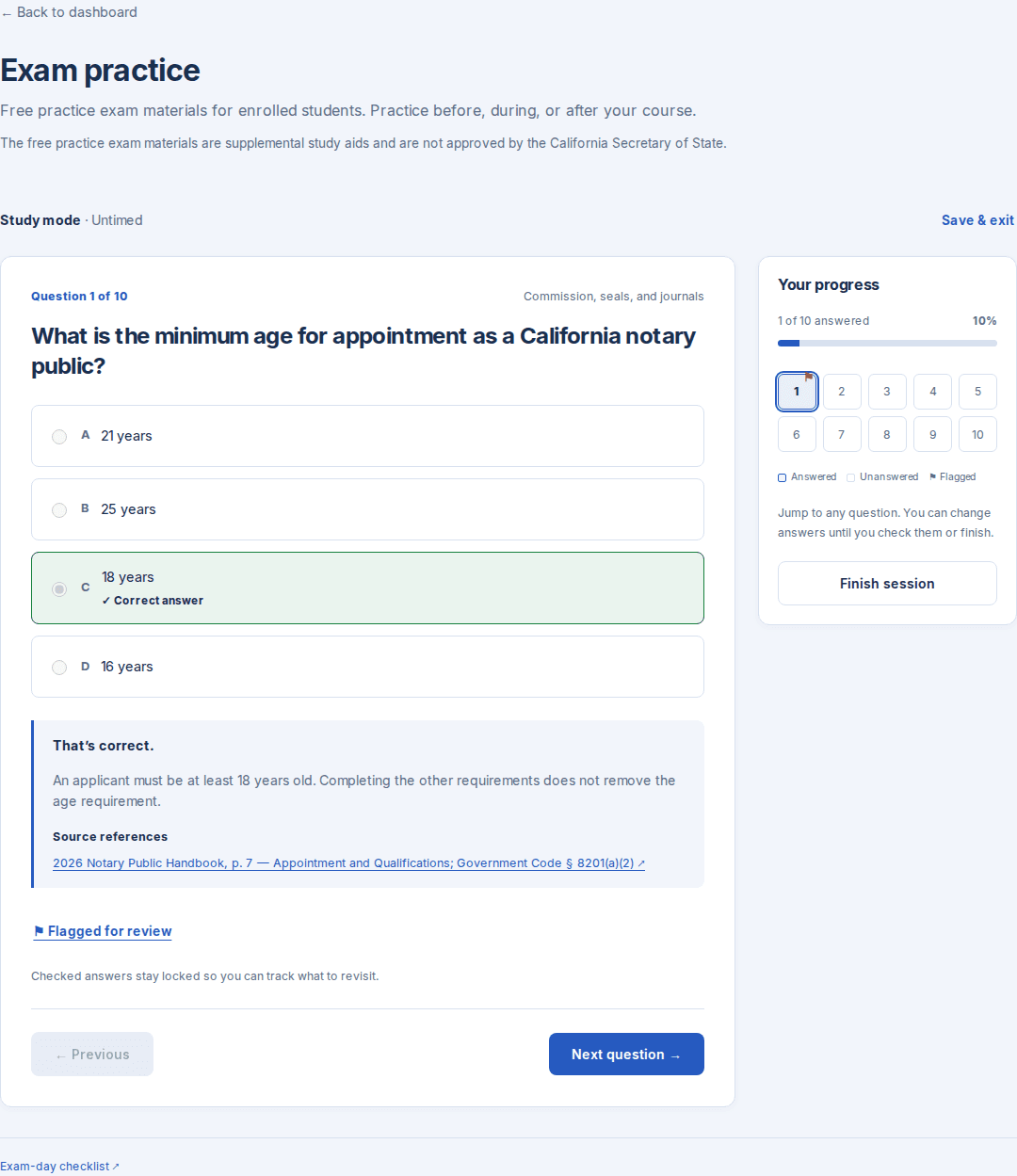
Sign in at /student and use the Exam Practice card to launch Study mode (instant explanations and Handbook citations) or Practice Test mode (untimed, scored at finish).
Open the Downloads tab on /student to download the 2026 California Notary Public Handbook PDF and course workbook PDF.
Practice sessions and flagged questions save in your current browser; clearing browser data removes saved local sessions. Practice and Downloads stay available while your enrollment is not revoked, even after the 60-day lesson window ends.
Important: Practice questions are supplemental study aids and are not official CPS HR exam questions or part of state-mandated instructional hours.
Study mode inside the student portal explains each checked answer and links directly to the 2026 Notary Public Handbook.
How do I download a payment receipt or request a 60-day refund?
Printable receipts are available in your Student Dashboard, and full refunds are available within 60 days before course completion or certificate issuance.
To view or print a receipt, sign in at /student, open your order history, and select View Receipt (/student/receipt/{orderId}).
You may request a full refund within 60 days of your original purchase date, provided you have not completed the course and no Proof of Completion certificate has been issued.
To request an eligible refund, email admin@canotarycourses.com with your order number. Support replies within one business day.
We reply to email and lesson-forum questions within one business day (Monday–Friday). Questions sent on weekends are answered by the end of the next business day.
We provide course support and educational explanations. The California Secretary of State decides applications and commissions; the exam administrator handles exam booking; your county clerk handles oath and bond filing. Contact those offices directly for decisions, appointments, and filing requirements.